
MageQuest's worlds are big, so getting around quickly matters. Mounts make the long roads shorter, and Quick Travel takes you straight to places you have been before.
Your first mount
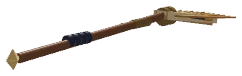
Early in Northgarde, after you clear Warden's Hollow, you are given a Starbroom with golden bristles and a ribbon that never quite behaves.
- Open the Mounts page of your Journal.
- Choose or equip the mount you want to ride.
- Use the riding control when you are outdoors.
Most mounts make you about 40% faster than walking. A few Swift mounts go faster still.
Kinds of mount
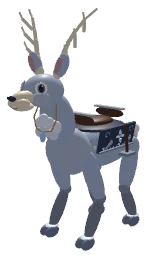
There are 43 mounts in MageQuest. Each one is either a Ground mount, like a stag or a bear, or a Hover mount that floats along, like a broom, a carpet or a drake. They come in every rarity from Common to Legendary, and each has its own look, sounds and idle moves.
Buying mounts
Stables and shops in each world sell mounts for coins. Prices go up as you travel further:
- Star & Saddle, Northgarde: Cloudling 3,500 coins, Astral Carpet 4,000, Runeboar 4,500, Mossback 5,000, Honeypaw Bear 6,000 and Moonstag 6,500.
- Star & Saddle's Academy collection: Enchanted Folio 7,000 and Bubblebrew Cauldron 8,000.
- The Shattered Coast: Wayfarer's Skiff 9,000 and Coralcrest Seahorse 9,500.
- Cinderglass Reach: Sunwheel 11,000.
- The Rimebell Highlands: Chimehorn Stag 12,500 and Snowmantle Bear 14,000.
- The Verdant Veil: Bloomhopper 15,000.
Rare mounts from bosses
Many dungeon bosses have a small chance to drop a mount, usually 2%. In Northgarde you can try for:
- Thornstep Hare in Whisperroot Burrow.
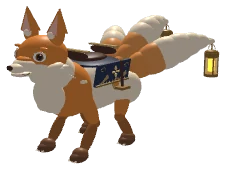
- Lanternfox in Warden's Hollow.
- Gloamwing Moth in Gloamwatch Tower.
- Emberwing Drake in Emberglass Foundry.
The rarest of all come from The Meridian Spire: the Legendary Astral Orrery (1%) and Bound Star Fragment (0.5%). Some other mounts are found in the Starshard Emporium.
Mounts and your pack
Mounts count as gear, so each one takes a space in your pack. Mounts stay with their rider, which means they can't be traded. See Gear and crafting for how pack and bank space works.
Quick Travel
Quick Travel saves you long walks. It can take you to the main town of every world you have opened, like Northgarde Town Square or Tidehaven Harbour, and to the spots you have marked yourself.
Making marks
You can mark almost any spot in the worlds and come back to it later:
- Stand where you want to return to.
- Press Mark This Spot in Quick Travel.
- Pick the mark later to jump straight back.
Good to know:
- You have 5 mark slots. When they are full, choose a mark to replace.
- Each mark is named after the nearest landmark, like "Near Market Overlook".
- You can't make a mark inside a home or during a battle.
- You can mark a spot inside a dungeon, but that mark fades once your dungeon recall ends.
- There is a short wait of a few seconds between jumps.
Keepsakes
The first time you make a mark in some areas, you get a little keepsake for your home. Marking Elmwood Way gives a Mossy Garden Gnome, and Tidehaven gives a Ship's Wheel. See Housing.
Going home
Once you have a home, the Home button beside your Journal takes you there. To reach a brand new world, follow the main story to the World Gate. See the Worlds overview.